Feel the exact moment to release.
ShotPocket learns the arm position you release from, then taps your wrist the instant you hit it — every shot, in the same place. That is what turns a good release into muscle memory, and it is the whole point of the app.
No account. No sign-up wall. Nothing leaves your phone unless you send it.
Form, arm position, and the feel of a good shot
Shooting is a movement you repeat, and the thing that stops it repeating is that you cannot feel where your arm was. ShotPocket gives you that feedback on every shot, without a coach standing behind you.
It learns your release position
Eight shots. The watch reads where your forearm actually is at the moment the ball leaves your hand — the angle, held against gravity, so it does not drift as the session goes on. That pose becomes the reference for everything after it.
It taps you when you reach it
Not on a timer — on position. Your arm arrives at your release pose and the haptic fires there, whether you are fresh on shot three or tired on shot ninety. A stopwatch drifts as you fatigue; a position does not.
The same feel, a hundred times
That is what builds muscle memory: not being told afterwards that a shot was wrong, but feeling the same thing at the same instant, shot after shot, until your arm goes there without being asked.
And it scores whether you held it
PocketScore compares your shots to each other — how alike the wind-up, the peak and the release were. Rising means your form is holding together. Falling means it is coming apart, usually before you notice.
- It cues YOUR release, not a textbook one. The watch has no opinion about correct form and will not pretend to — it cannot see the ball, the rim, your elbow or your feet. What it can do is tell whether you repeated the shot you calibrated, and tell you the instant you are in that position. Calibrate on shots you are happy with, and it grooves those.
- Shots that never reach that pose are counted separately. If your arm keeps falling short of your own release position, the session tells you how often — which is usually the first sign of fatigue, or of a strap that has moved.
The screen you shoot in front of
Built to be read in a half-second glance with a ball in your hands — and to work when you never look at it at all.
- 1Made and missedCounted separately, so you never have to work one out from the other.
- 2Percentage and shotsOf the shots you actually marked. Unanswered ones are not quietly counted as misses.
- 3Your last twelveThe run you are on, at a glance. Green in, red out.
- 4HIT and MISSGreyed out when no shot is waiting — you cannot score a shot that never happened.
- 5The countdownHow long you have to mark it. Let it run out and it becomes a miss, flagged as one you did not answer.
- 6Status chipsWhether the cue is armed and which motion source is running. No hunting through settings mid-session.
- 7Not a shot, and EndThrow away a false count without touching the score.
The phone is where you read it
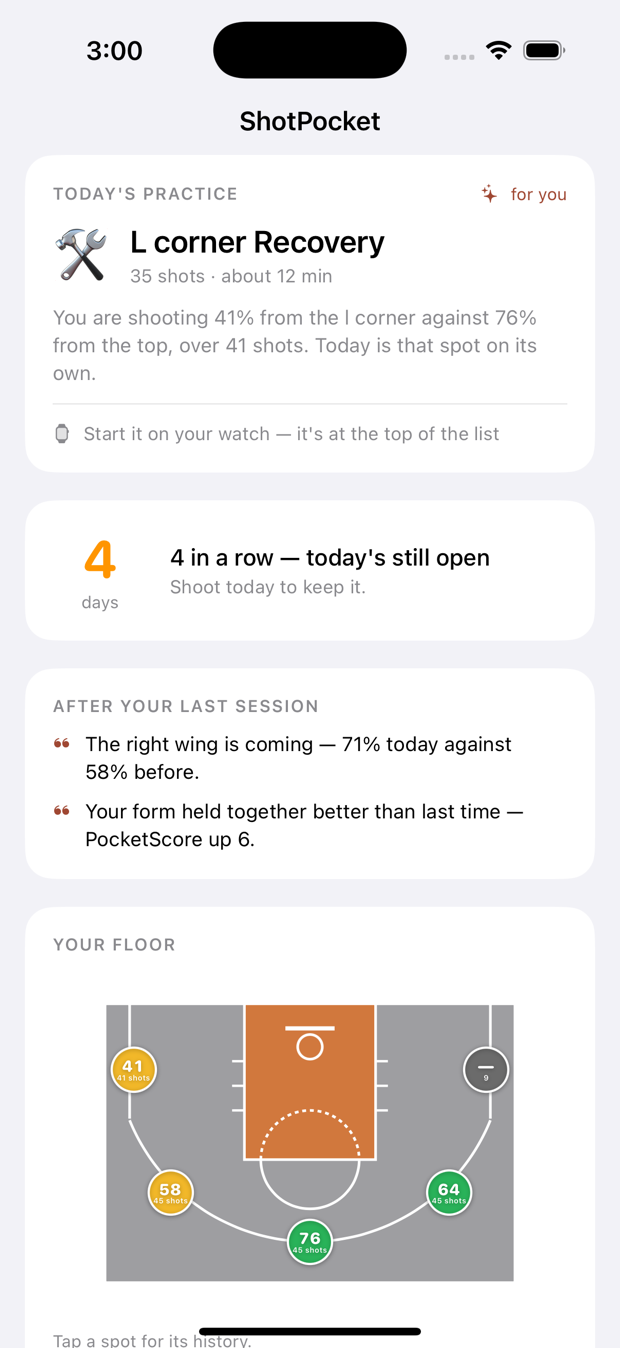
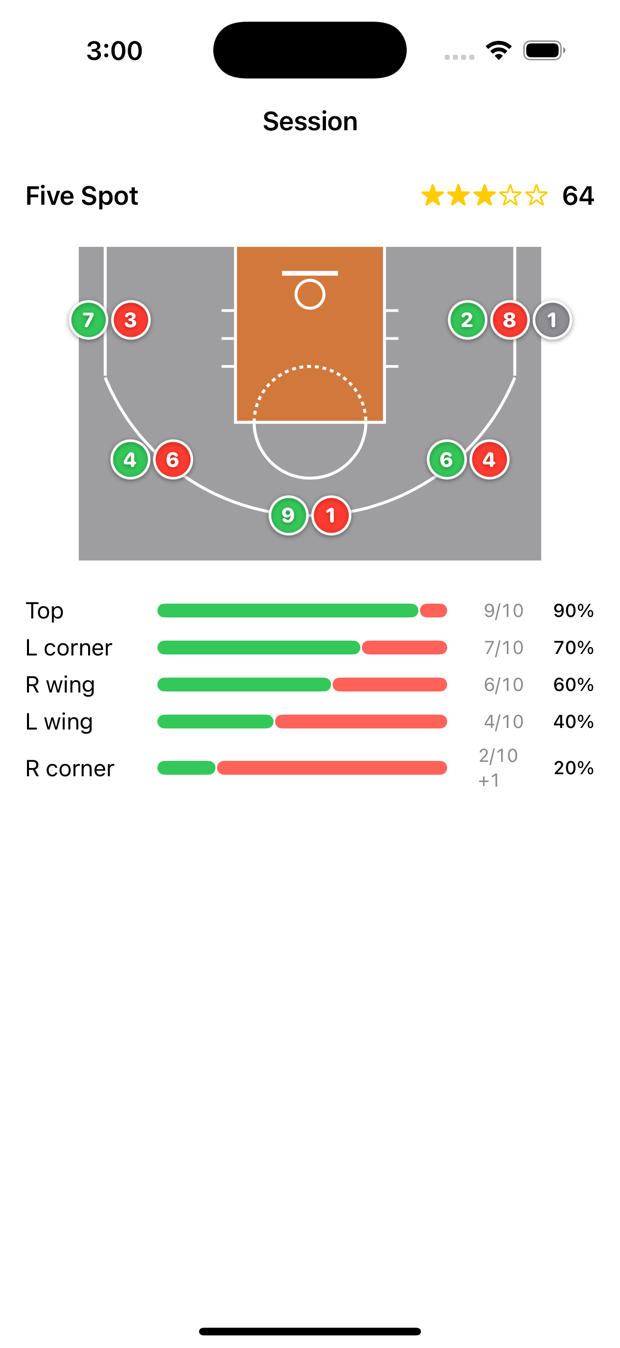
You shoot with the watch and never touch the phone during practice. Afterwards, this is what is waiting: what to work on, why, and every shot on the floor.
Three things a watch can actually do well
And it does those, rather than claiming the ones it cannot.
Know a shot from a pump fake
A jump shot and a fake look almost identical for the first fifth of a second. The detector waits for the part where they separate, then counts one and ignores the other.
Buzz where your release is
Eight calibration shots teach it the pose your arm is in at release. From then on the cue fires on position, not on a stopwatch — so it lands in the same place whether you are fresh or on your ninetieth shot. Calibration is saved and reused.
Score how repeatable you are
PocketScore measures how alike your shots were, not whether they went in. It is the thing you can fix without a rim, and the thing that stops being true when you get tired.
Three ways to say it went in
Two of them work without looking at the watch, which matters when there is a ball coming back at you.
Tap the screen
HIT or MISS, the obvious way. Best when you are catching your breath anyway.
Double Tap
Apple's pinch gesture, no screen contact. Needs the display awake and ShotPocket in front — otherwise iOS takes the gesture for itself.
Twist your wrist
A deliberate flick, screen off, eyes on the rim. You choose whether a twist means made or missed, and how hard it has to be.
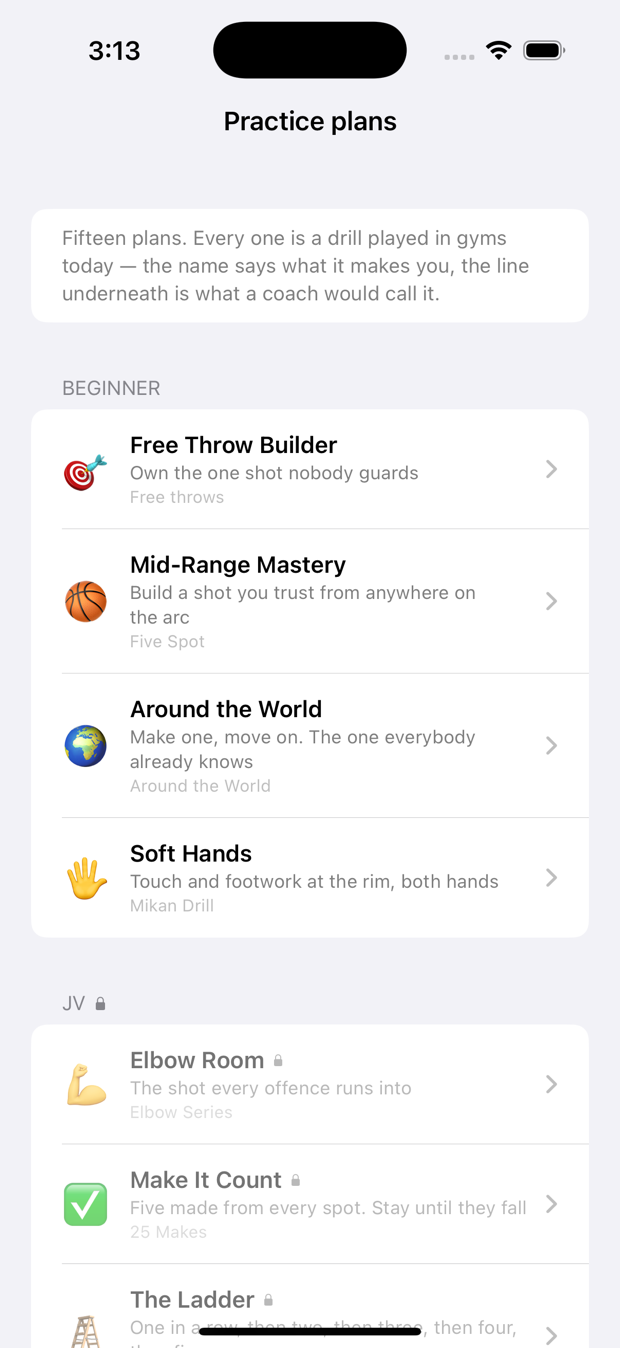
Fifteen practice plans
Named for what they make you, with the drill a coach would actually call it underneath. Plans unlock as you level up — but every one is readable before you get there, because a level you cannot see is a level you cannot want.
Beginner
- Free Throw BuilderFree throws
- Mid-Range MasteryFive Spot
- Around the WorldAround the World
- Soft HandsMikan Drill
JV
- Elbow RoomElbow Series
- Make It Count25 Makes
- The LadderFree Throw Ladder
Varsity
- Ice in Your VeinsPressure Five
- Star ShootingStar Shooting
- Rise and FireOne-Dribble Pull-Up
College
- Game WinnerBeat the Buzzer
- Read and ReactRandom Spot
Elite
- Fourth QuarterFatigue Shooting
- Beat the ProBeat the Pro
- The Century100 Makes
A plan can change on you
Pressure adds a make-or-restart rule. Buzzer puts a clock on the shot. Random shuffles the order so you cannot groove one spot. Adaptive sends you back to whatever you just missed. Fatigue makes you run first.
Score, stars and levels
Each plan ends with a score out of 100 and up to three stars — accuracy, plus how much of the plan you actually completed. Enough good scores and the next level of plans opens up. It is not a skill rating and does not pretend to be one.
Plans built for your worst spot
When the floor map has enough shots to be sure, the coach generates a recovery plan aimed at the spot that is actually letting you down — not a generic drill with your name on it.
Or commit to a season
A numbered run of days, each with its own plan. The difference from a single drill is commitment — being seven days into something is what gets you back to the gym on a day you would otherwise skip.
30-Day Free Throw Challenge
One shot, thirty days, nobody guarding you. The cleanest way to see whether your form is actually getting more repeatable.
14-Day Mid-Range
Two weeks inside the arc, where most games are actually decided.
21-Day All-Court
Every spot, every kind of shot, three weeks.
Miss a day and nothing resets. Days are completed, not dated — skip Tuesday and you are still on day 7, you just get to it on Wednesday. A season that punished one bad week by starting over would turn the week everybody has into a reason to quit.
A coach that shows its working
The point is to remove a decision, not to add a feature. A shooter who has to choose a drill before every session eventually chooses the one they are already good at, and then stops opening the app.
It refuses to guess
A spot is not a weakness until it has twenty attempts behind it. Below that the coach says so and gives you something sensible instead of dressing a guess up as personalisation — which is what every app that "knows you" on day one is actually doing.
Written coaching, or not at all
Turn it on and your numbers — never your raw motion, never your surname — are written up into a few sentences. Turn it off and the same coaching is written on your phone, offline, sending nothing.
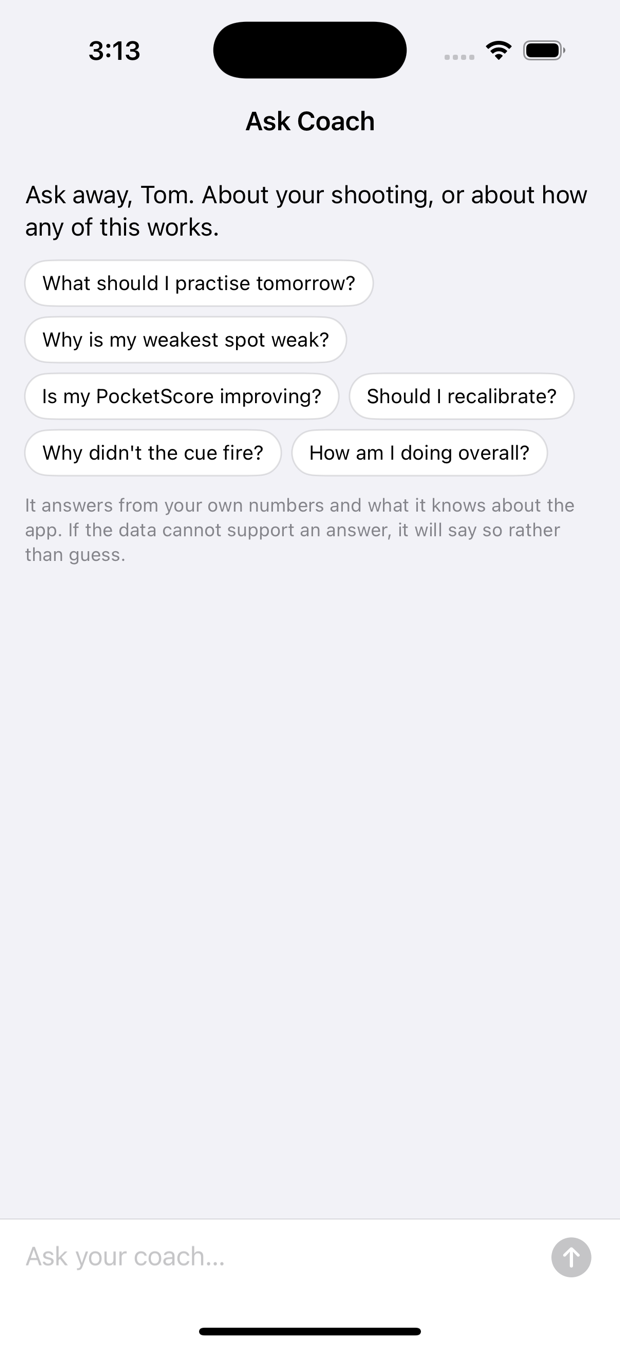
Ask it anything
"Why is my left corner weak?" "Should I recalibrate?" "What should I practise tomorrow?" It answers from your data and from how the app really works — and tells you when there is not enough to say.
Fourteen badges, all earned by shooting
No badge for opening the app. No badge for looking at your stats. And every locked one tells you how far away it is, because a mystery badge is not a reason to go to the gym and 340 / 500 is.
In a row means in a session. A run that survives going home, sleeping and coming back is not what anybody means by in a row.
It stays yours
No account, ever
No sign-up, no password, no email. Your history backs up to your own iCloud and a new phone picks it up on first launch.
The recordings never leave
Raw motion is about 130 MB an hour and stays on the watch and phone. Not uploaded to us, not even to your own iCloud.
Throw out a bad session
A battery test on the sofa, or a watch worn by somebody else, would otherwise sit in your numbers forever. Exclude it and it stops counting without being deleted.
What it can't do
Every shooting app has these. Most do not print them on the front page.
- It does not know if the ball went in. A wrist cannot see a rim. You mark the make — tap, double-tap, or a twist of the wrist so you never look at the watch.
- It does not know where you are standing, unless you are running a plan that told you where to go. There is no GPS indoors worth the name.
- It will fire on a hard pump fake that reaches your release pose. If your fake is good enough to fool the watch, it is good enough to fool a defender.
- One shooter per watch. The calibration is yours; lending it to a teammate means recalibrating.
- PocketScore is not a skill rating. Repeatable and correct are different things, and it only measures the first.
The court is the point. Numbers tell you that something is wrong; the floor tells you where.
It's in beta
ShotPocket is being tested now, on real courts, before it goes to the App Store. If you have an Apple Watch and a gym, we would like your shots in the data.
Requires an Apple Watch Series 6 or later on watchOS 10, and an iPhone on iOS 17.