How to shoot with ShotPocket
You bring the form. ShotPocket handles the counting, the timing, and the record — all on your wrist, so your eyes never leave the rim. Here's the whole loop, from strapping on the watch to reading your form back.
Set up — strap in and start
Wear the watch on your shooting hand — the wrist that releases the ball. That's what lets ShotPocket read your real release and follow-through, instead of your off-hand just riding along.
Most people wear their watch on the other wrist — move it over for practice.
Keep it snug, too: every threshold was measured on a watch that doesn't slide, so a loose strap changes what the sensor sees. Then open ShotPocket on the watch, tap Start Practice, and allow the workout when it asks. Your phone can stay in your bag.
Dial in your form
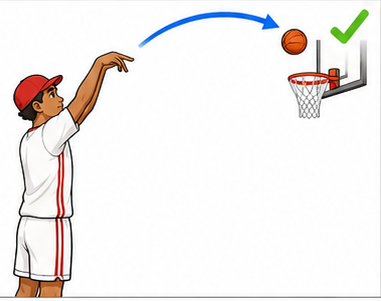
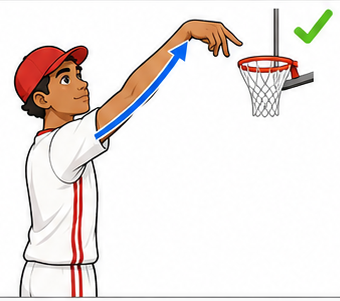
ShotPocket measures how repeatable your shot is — so the shot you groove is the one it learns. Before you start, it's worth a minute on the fundamentals: balanced base, elbow under the ball, one smooth motion, and a held follow-through.
The better your form is here, the more the numbers are worth.
Learn proper shooting form →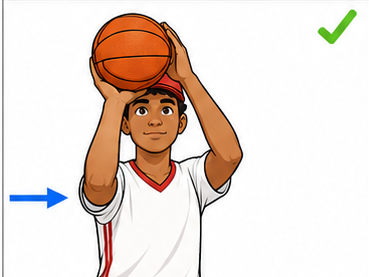
Calibrate — your first 8 shots
With the release cue on (it's on by default), your first eight shots teach the watch your release. Shoot them with your normal, best form. From then on, ShotPocket knows your set point and can buzz at the exact instant you let go.
It only calibrates once — the pose is saved and reused, so later sessions start already armed. You can recalibrate any time.
Rush these eight and the cue learns a bad habit. Shoot your best.
Shoot — and feel your release
Now just shoot. ShotPocket counts every attempt, tells a real shot from a pump fake, and — once calibrated — gives a short buzz the instant you reach your release point. It's a feel for "on time," so you can stay locked on the rim instead of watching a screen.
The buzz is tuned to the release step of your form — the top of your motion.
Mark every make and miss
After each shot, tell ShotPocket whether it went in. Four ways, including two you can do without looking:
Tap the screen for a make · Double-tap in the air · Twist your wrist · or press the on-screen HIT / MISS. Miss the window and it counts as a miss — shown, never silent.
Kept as a real record: made, missed, and where, every shot.
Read your form back
When you're done, the session travels to your phone on its own. There you get the numbers that matter: your make percentage, and a PocketScore — how repeatable your release was, which is the thing that actually predicts a shooter.
A court map shows your best and worst spots, and history tracks whether you're grooving the shot over days and weeks — the whole point of shooting the same motion a hundred times.
Back to the fundamentals →